Saturday, September 12, 2020

TpT Extra Bonus Sale Coming Soon

 I'm joining the Teachers Pay Teachers Extra Bonus Sale on the 15th.  You will save 20% off in my store.  More details on the TpT sale info page.

Be sure to follow my store to get updates on the sale - GillianIvy Chasing Grades


Download for Instagram - 1080 × 1080

Saturday, August 1, 2020

Teachers Pay Teachers BTS

Join me for the TeachersPayTeachers upcoming Back 2 School sale, use BTS20 to save up to 25% off starting this Tuesday!

Download for Facebook - 740 × 400

Friday, January 13, 2017

5 Easy Arty Crafty Ideas for Homeschool

Chase does best with some hands on projects we can do together.  These would make great gifts for grandparents or to sell at craft fairs/yard sales.

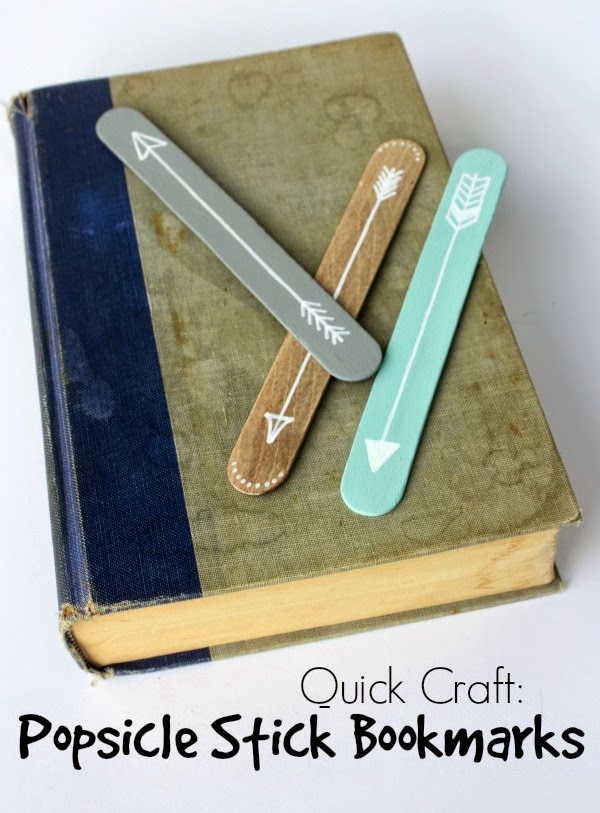
  1. Rock Paper Feather: Quick Craft: Popsicle Stick Bookmarks: written by: Stacia Grafton

    He is an avid reader, so one thing we can never have too many of?  Bookmarks!  These can be collected in a cup on his nightstand and be ready for any book he reads.  The best part, polishing off some popsicles to get these sticks!
  2. Tic Tac Toe Rocks Activity or Gift: written by: Megan Bray

    Always collecting rocks and pebbles, this may be a fun activity for him to find use for them.  Perhaps even painting the entire rock.
  3. Decoupage Paint Stick Magnets: written by: Amy on Stow & Tell U

  4. Marshmallow Shooters: written by: Heidi on Happiness is Homemade

    This would just be super fun.  Maybe more of a spring/summer activity, but one to keep in mind for the future.  Edible ammo.  This would pair nicely with our plans to build a Nerf obstacle course in the backyard.
  5. Beautiful Wrapped Bottles: Found on homedit.com, via Penelope and Pip (blog no longer active)

All images and project ideas belong to their respective copyright holders.  If any of these are accredited incorrectly, please contact me with the updated information.  These are all projects we haven't tried yet, but I've made this list to bookmark them for inspiration.  I'd love suggestions for similar projects, crafts that can be done with items on hand or very inexpensively.

I think I'll have Chase make a DIY.org entry for one or more of these.  He loves the DIY and Life Hack type of things.  Hands on learning is the best kind 💚

Thursday, November 17, 2016

Instant Ink - One Month Update

So, I've been using the Instant ink service for almost a full month now.  I have the $9.99 plan for 300 pages currently during the promo period so I can take full advantage.  Which can be changed at any time.

So, checking the price on Amazon, we have saved roughly $70 so far.  The initial starter kit + now we have been shipped refills for both color and black cartridges.  The combo pack on Amazon costs $36.  Plus the ink cartridges are nearly double the size of the standard XL ones!  So, the value is much greater.

Now, if I get referrals, I can earn more free months of printing.  Even if you only get one free month for starting up, the savings are well worth it from the very first starter shipment.  Since the highest rate price is only $10/month.

I will be using this for more than just homeschool.  I have an art business I do from home and can now offer printed services and products.

I've received these extra cartridges and have not yet installed them.  My ink supply isn't even really low.  I've printed so much this month period because I was using the Printables services for homeschool work sheets from places like education.com.  The Printable apps ended in October, so there won't be any more automated daily printing.  I can still find things to print, but will have to go to each site and manually choose my prints.

I'm going to be getting rollover minutes, which after I surpass my 300 mins in the month it will deduct from there before charging me for overage prints.

So, in closing, I'm pretty satisfied with this service.  It is even cheaper than buying knock off inks that may not bypass the HP Proprietary filter.  Though, I heard they removed that after several complaints.  This is definitely the most affordable option for us.  If you have an Instant-Ink compatible HP printer and are interested in signing up, please use my referral link.

Try HP Instant Ink

Thursday, October 13, 2016

Epic Foam Explosion

Today's DIY Project - Create a Foam Explosion


Elephant Toothpaste Foam Explosion

We're doing the "Elephant Toothpaste"(kid friendly version) as demonstrated by Steve Spangler Science.

Ingredients:


  • 4 oz Hydrogen Peroxide
  • splash of dish soap
  • desired food color (optional)
  • Yeast solution (dry yeast + water)


In a disposable bottle we measured 4 oz of peroxide.  Chase then  mixed in the dish soap and food color before adding in the catalyst.  We used yeast for a kid friendly version.  Chase also wore safety glasses and this was done on our junk picnic table (it needs to be fixed).  Then, explosion!  Much more impressive than the old baking soda and vinegar volcano!  :D  This foamed up real fast and kept erupting.  He was quite impressed.

The project page has member projects and how to's for you to learn how.  Chase is posting up the video of his project now, which may take a while for it to load on DIY.org.  But here it is below:


HP Instant Ink

We've started up with HP Instant Ink to try to save money on our printing costs.  We have an HP Instant Ink compatible Printer, HP OfficeJet 3830 Series (affiliate link).  HP's program will save a lot of money on ink, since it charges per printed page, rather than amount/color of inks used.  And you get rollover pages, up to your plan amount.  We're starting off with the 300 page plan, which is normally $9.99, but we have a promo giving us a free month.  If you want a free month, you can sign up with our link - Instant Ink.  It grants us one month free and new enrollments also get the free month.  

It will send the ink before we run out, there are 3 different plans to fit your budget and you can change them any time.  $9.99 being the highest with 300 pages.  I probably won't be printing anywhere near that much, but I wanted to start with the higher plan while I have it for free.  Also, buying ink costs more than $10.  I'll write up a proper review after I've received it.  I plan to use my printer for both homeschool and professional art projects, like printing out my digital stamps and papers.  So, hopefully, I'll get some good use out of it.  The HP Connected website gives you a comprehensive record of your usage, so you can see how much you're using and adjust your plan accordingly.

Wednesday, September 14, 2016

Mayan Book - Grolier Codex - Activity Page


Free drawing coloring page for the Mayan Civilization.  I'm using this as part of my lesson plan to go in Chase's Social Studies interactive notebook.

Recently, PBS published an article finding that the "Grolier Codex", originally thought to be a forgery, was in fact, a true artifact, depicting deities that were unknown at the time of its discovery and therefore could not be faked.

It has several images linked from a gallery of the pages.  For my unit, I am having Chase study the images, watch some videos on Mayan culture and read the article about the "Grolier Codex".  Also, there was an interesting tidbit about the Quetzal bird, a very long feathered and beautiful bird, that was seen as a messenger to their bird deity, Quetzalcoatl.  They used the feathers of the male bird for their headdresses and ceremonial adornments.

For this activity/coloring page, I have adorned the borders with Mayan styled drawing, using the apparent number code from the codex as the side borders.  The Mayan culture revolved around the stars and the dates, so those would be recurrent themes as well.  The sheet is 8.5" x 11" but can be shrunken down for interactive notebooks.  I set mine to print as 8" x 10" and deselected "fit to page" in the Windows print options.  Your printer may need adjusting, run a test print.

This could be used for guided drawing.  Tell them to draw a one sided figure, like in my drawing and to exaggerate the nose.  Tell them to draw an animal on top of their head with big eyes, like a funny hat or headdress.  Then they can choose what the character is doing.  Holding corn or a snake by the tail, or holding a spear.  Then, they can decorate the empty spaces with patterns from lines and dots in elliptical shapes, kind of like a rounded rectangle.

Sunday, September 11, 2016

Latest Arty Project - Texas Auction


My family is holding an auction and fundraiser to help my Uncle after losing his wife to cancer this year and he has fallen into some financial strife.  I'm making a new mixed media painting, which will be going to auction.

Spent half the day yesterday and today assembling roses and making petals.  These will be attached to the canvas with gel medium and all painted and incorporated.  I may not be able to send it to Texas in time for the auction, but perhaps as an online auction instead.  I'll have to contact my Aunt for details.  I would prefer to send it directly to the recipient.

I wanted to make something special for the auction, rather than send an existing work.  I may be sending prints of my other works for the actual auction.

Wednesday, September 7, 2016

Tosanoides Obama Pyle Fish

Next assignment for Chase is on the newly discovered "Tosanoides Obama Pyle Fish" from the genus Tosanoides.  They are named after our President for his conservation efforts to expand the Papahanaumokuakea Marine National Monument.

So, I've decided to release a little clip art of this cute little fish.  One b&w version with just the lines and another of the colored version.  JPG and PNG version of each.

I used a photo reference from National Geographic's website, taken by Richard Pyle, the man who discovered this new species.  As such, this is a completely free resource with share and share alike permissions.  As in, any products made with this should also be free.  It is an educational resource from a news source and I am uncertain if it is in the public domain or not.  This is, of course a hand drawing that is watercolor painted on card stock paper.  So would fall into fair use, however, I feel this little fish should swim freely.

Don't know what his non-Scientific nickname will be, I am guessing "Obama Fish"  ;D

Download on TeachersPayTeachers


This fish will be named in honor of President Obama for his commitment to protecting nature through the expansion of the Papahānaumokuākea Marine National Monument.
PHOTOGRAPH BY RICHARD PYLE

Bonus!  Free Coloring Page!  Just randomly decided to make a coloring version print page.  You can give guided instruction for the colors of the fish, or use print outs of my watercolor version as example, or let the students color however they like.

Monday, September 5, 2016

Digital Stamps


I have several digital stamp files, wondering if they would be useful clip arts for TeachersPayTeachers.

Just printed some out onto watercolor paper as a batch of Patron rewards.  Debating whether or not I should color them with my shimmering watercolors or send them blank for them to paint/color as they please.

These can be attached to a card face as focal images of greeting cards, or added to art journals, scrapbook and mixed media collages.  I've tested my printer ink and it doesn't seem to bleed with a light amount of watercolor.  Not sure how it would do with a heavy wash yet.

These are currently available on my Patreon and also my Gumroad as digital downloads.  Print on paper of choice and they are ready to go.  If you have a laser printer, you can do image transfers, just remember to mirror the image first.  That is the ideal method of transferring digital stamps into art collage/art journals, as it gives it a perfect blend.  But you can also print onto tissue paper, attach it to card stock securely first, and then, print and it can be decoupaged into the project and the paper will fade into the bg.

So, opinion poll, painted or not?

Friday, September 2, 2016

First Weeks in Review + Dungeon Crawl!

PBS Learning Media Storyboard for new school year
Friday and gave Chase a test and storyboard assignment this morning to review what we've learned so far.  I made my own storyboard to highlight a few of the things.  Just a good way to keep track of what we've learned.  Don't see anyway to embed these.  It is similar to the Glogster posters, though those you can embed.  However, Glogs take a long time to load, I think it is all flash or something.  This could also be used as a presentation for projects.  Though Windows 10 has a built in app that might work better.  It's called Sway.  I'll have to play around with it a bit to see how useful it would be.  The storyboards are simple, and that can be good enough.

In the afternoon, we did our first dungeon crawl.  Only made it to the first room of the Old Aqueducts, though.  We had a random encounter with 4 tiny scorpions and they kicked our butts because we couldn't hit them!  Hahaha.  Well, after Kai (Chase's fighter) fell into a floor trap that nearly killed him, we took on a huuuuge centipede and destroyed it.  Then there was lewts.  Emberlyn (my pirate/rogue) found some gold and split it (evenly, of course! ---- not!) and Kai found a glowing gem and a cool sword.  Our NPC, Asila, a second year Healer student, found a small silver ring.

That is as far as we got, had to have them take a short rest...  Guess we're combining 3.5 and 5 rules to try to simplify things.  Rather than make us spend the night in the dungeon when it should really take one night only.  We're exploring a tunnel under our school and they would probably have to send a search party after us if us first years didn't make it back.  But hey, we did sign the waivers that adventurer's school could mean our deaths!

Chase has no problem solving math problems on the fly as he rolls his saves and attacks.  He did well with the roleplay part, with a character afraid of bugs and our first encounters....  My character flaw has a fear of ghosts.  Kevin wanted us each to have a flaw to make our characters more interesting and have fun to roleplay with.

For our table, we bought a shower curtain as it is cheaper than a large vinyl mat, cut it to size and we're using overhead markers to write on it.  He made a dungeon map to go under it and drew on all the features and added tokens as encounters.


The DM notes and encounter tokens!


New miniatures for our characters from Reaper Mini.


The full table view of the dungeon.
Oops, just remembered, forgot to do school pictures today.  Well, maybe we'll take them on Monday.  We were still discussing what to do with them.  Last year it was Minecraft themed, where I used a green screen to superimpose him into a Minecraft scene he composed.  I think he wants to do that again, but after looking at the portrait of Benjamin Franklin with his favorite things to present himself as a person who believed in the Age of Enlightenment, he might want a tailored portrait.  Maybe styled as a painting.  Only my Wacom isn't compatible with Windows 10, plus I managed to lose my stylus!

Last year's pictures!  2015-2016 School Year - 3rd Grade

Thursday, September 1, 2016

Dual Challenge - DIY


This week's DIY, I have a double challenge set up for Chase.  Both of these should be pretty easy but as an extra bit of work, I want him to use the Storyboard Tool on PBS Learning Media to do the assignment portion, where he adds in his media, text, links and details with a bg and on a timeline style layout like a blog post.  It's similar to Glogster which he is already familiar with, but has a much cleaner design and an easy to use template for drag and drop and rearrangement of elements.  Actually, it's like a website builder.

I'm going to be having him use this for 'week in review' type of assignments.  Where he'll be adding what he has learned through out the week to his storyboard.  So I want him to practice with it so he is prepared.  I'll have to make one as well so he has an example to work from.  Do our own, homeschool so far story.

Sunday, August 28, 2016

Productivity!

I feel super accomplished.  Just finished setting up assignments for next week via PBS Learning Media.  This site really is brilliant.  There are many ready made lesson plans as well as media resources to build your own.  I really like the Lesson Builder, it makes everything a snap.  Chase is enjoying the ease of it as well.  It is way more interesting than Scootpad or any other lesson resources we've used in the past.  I can export all his handed in work to Google Drive.  So grading his work should be a snap.

I still need to come up with the DIY project and an art project, but otherwise, the next week has been prepared.  Last week we did storyboarding and character portraits.  I want to keep everything related to his gaming project for now.  Perhaps we will do some pixel art for art class, I know he'll really enjoy that.  I'll probably have the two assignments be relevant to each other.

Here's my PBS Learning Media Dashboard.  It is looking pretty spiffy.  I have assignments, a puzzle, a quiz and a storyboarding assignment readied.  For the storyboard, he'll be making a pictorial of things we have learned so far.  I'm only asking for one key feature of each topic.  Just to familiarize him with the storyboarding mechanics.


Real Math

I have gestational diabetes and have to keep track of my blood sugar levels.  Chase is, of course, aware of this, so it is something he can feel more a part of helping me keep myself in my goals.  I've created an assignment with my real data in it for him to plot on a graph, and calculate my averages and use reason to determine if my numbers are improving or getting worse or staying the same.

This assignment is still marked Private, as it does have more personal information in it.  But I wanted to share it here as it may be useful to others to either create their own lesson plan based off of it by customizing it, or do something similar with their own data that their student(s) can track.

I think real world information is more effective than random numbers from some questionnaire.  This is something he sees me checking every day.  I poke my fingers 4 times a day and send my numbers to my doctor every week.  So, he knows it is important and we have discussed carb counts of food and what is in my allowance and what foods still spike my numbers even though they are in my allowance.  So, he can help me be aware that my numbers are not as good as they were a month ago, closer to when I first started tracking.  I think I've been doing this for about 2 1/2 months now.  I have been slipping lately and allowing myself to get out of the range and eat foods I know will spike it.  Tonight, I had a banana mashed with peanut butter as my fruit side.  Bananas are really high, but since I had a low main course, I thought it would be okay.  Nope, it rocketed my numbers to 140.

So, here are my numbers and my graphs.  Check out the lesson "Blood Sugar Graph" on PBS Learning Media.  I think it is under the CCSS Math 4.MD.B - Represent and interpret data.


Friday, August 26, 2016

Watercolor Zen Doodle Printable

Free Download on TpT
Finished scanning and uploading my watercolor doodle from last night.  This was a great way to wind down after boning up on lesson plans for Chase.  I stayed up way too late.  This seems to be every night.  These are now available both the freebie and the complete set of full resolution images as clip art with permissions for personal and commercial use.

I've also made the download for the entire set available to my Patrons on Patreon who pledge $1 or more per month.  I have about a year's worth of free download content exclusive to my Patrons, and access to all of that is only $1.  Patreon is a crowdfunded platform where people subscribe to creators at a pay-what-you -want model.  Some creators offer rewards.  I offer all my digital downloads to various levels of my Patronage.  Higher tiers have access to everything.  I also offer more rewards, like Artist Trading Cards.   I mostly have artwork there, but will also be sharing my teaching resources.

Join me on Patreon


The complete Zip set of files on TpT

Thursday, August 25, 2016

Top Hat Dude Storyboard

Overall, today was a great day of school.  He got a little behind on worksheets, but made up for it by doing his 'homework' (finishing anything he didn't complete before he is allowed on the computer) and doing an excellent job with everything else.

We did the PBS Learning Media lesson I made on the Pledge of Allegiance.  He followed directions and wrote down his notes and vocabulary and made his own conclusions at the end.  I'm pretty happy with how that lesson went and he liked using the website.  Found it easy to use and likes it more than other sites we've tried.

So, I used their Lesson tool to create an assignment for his DIY.org challenge for the week.  I chose storyboarding as his topic, as it falls in line with his school project.  He will need to know how to storyboard as he plans out his game.  It will also help him take notes and visualize the D&D sessions.

I had him do a practice storyboard for fun.  He made this little day in the life of type of story for one of his stick men characters, "Top Hat Dude".  Yes, that is his name and he is rather dapper.  He is a hero sporting a rather fancy top hat and has no super powers, just a good guy.  Without further ado...


Top Hat Dude by Chase C. 2016


These aren't posted on the website yet, but will be soon.  This is under the 'animation' category, though it is also under 'filmmaking'.  There seemed to be more things he is planning to do for his project under the animation challenges.  Perhaps he can animate his scenes next week.  :D

Tomorrow's agenda is some epic Bill Nye in the morning and D&D in the afternoon.  I have some flats to color for Kevin's inks and need to upload all my plans to PBS Learning Media before school starts.  I was up too late working on it last night.  :B

Watercolor Doodling

It's late and just finished doodling.  Planning to make some digital graphics from this as a freebie.  Maybe as cut outs and as a whole.  It measures 2.5" x 5".  So, not even a proper bookmark size.  ;P  Wishing I had a paper punch to make some awesome circles or something out of it.

This was inspired by a Pin on Pinterest.  Shared it to my homeschool board.  Think we might do this next week.  I like to do paint doodles.  Ultra fun.

I'll scan these up tomorrow.  In the meantime, enjoy the preview ;D


Wednesday, August 24, 2016

Character Portrait - Kai by Chase

Kai - Human Fighter
After computer lab and worksheets in the morning, we got to do a much more fun art class in the afternoon.  Chase got to design his character portrait for D&D.  We demonstrated how to use a stencil template that Kevin had made to speed up character sketches.  Then we measured out proportions of where all the facial features would be.  Kevin drew a few variances of character design using the same template.

My cell phone cannot handle the lighting.


Kevin demonstrating different characteristics added to same template.  The template was made from a plastic container, he cut it, ironed, cut out forms, sanded it smooth.  Originally from a peppermints bucket.
So, we had Chase start with some preliminary sketches until he was happy with his character.  Then he redrew that using the template, and inked it.  He's not really into coloring much, but we'll get him a program on his computer so he can color digitally if he likes.